Over 20,000 organizations run Databricks today, including 60% of Fortune 500 companies. This scale makes the setup stakes higher.
A February 2026 Azure Databricks outage caused workspace failures and job interruptions across enterprise environments. The root cause traced back to configuration gaps, specifically the kind that a structured Databricks setup on AWS and Azure prevents. Configuration is where deployments succeed or stall, and it starts the moment the DevOps request lands on your desk: deploy a workspace, configure networking, connect storage, and keep existing VPC infrastructure intact.
Every networking question, every IAM permission conflict, and every storage connectivity issue traces back to one thing: which plane owns it. Get that clarity first and the rest of the cloud deployment follows a logical sequence.
Control Plane vs Data Plane: The Answer to Every Networking Question
Databricks splits into two planes, and understanding this split saves your team from opening tickets that answer themselves once you know which plane owns the problem.
- The control plane runs inside Databricks’ own cloud account. It manages the web UI, notebook commands, job scheduling, and workspace configuration. Databricks manages it entirely.
- The data plane runs inside your cloud account. On AWS, clusters run as EC2 instances inside your VPC. On Azure, they run as virtual machines inside your resource group. Your compute costs, security audits, and network connectivity all live here.
The two planes communicate through a secure cluster connectivity relay. Your clusters reach out to the control plane. The control plane never reaches into your network. That one fact resolves the majority of firewall configuration questions before they turn into tickets.
DevOps owns the data plane configuration. Data engineers work inside the workspace the control plane serves. Both need to understand where that boundary sits, because every misconfiguration gets blamed on the wrong team until someone draws the line clearly. Teams that hire Databricks developers with hands-on AWS and Azure experience typically resolve this boundary confusion before it becomes a production issue.
Databricks Setup on AWS: Step by Step
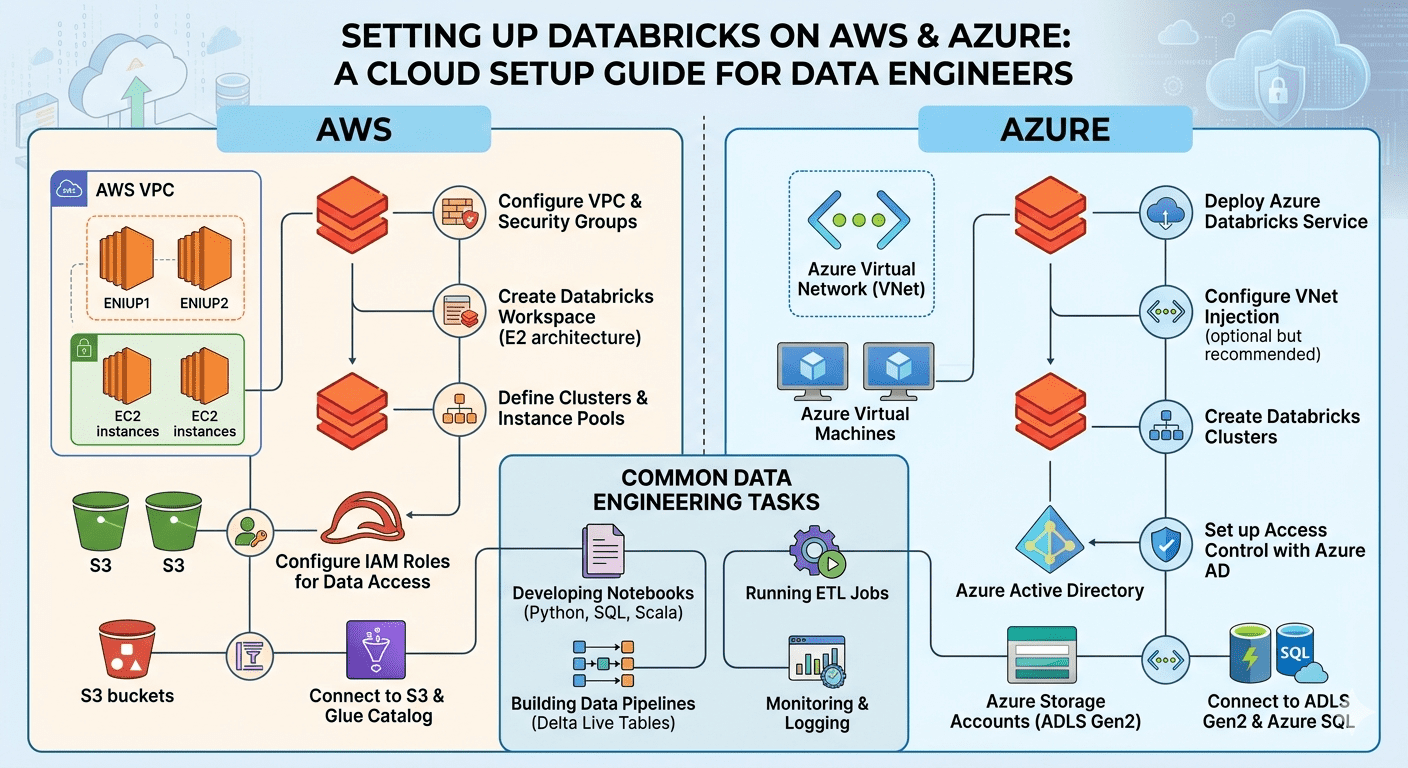
AWS gives you full control over how Databricks lands in your infrastructure, but that flexibility means more decisions upfront. The sequence below covers everything your team needs for a production-grade Databricks setup on AWS from network foundation to compute governance.
Step 1: Pick your VPC model before anything else
AWS gives you two VPC options: Databricks-managed or customer-managed. Databricks-managed deploys all networking resources automatically and gets a workspace running in under ten minutes. It works for proof-of-concept environments. For production, it gives your security and compliance teams nothing to audit or certify.
Customer-managed VPC is what production environments use. Your team controls subnet configuration, routing, security groups, and network boundaries entirely. Once you commit to customer-managed VPC, four components need to exist before registration can happen:
- Two private subnets in separate availability zones for cluster deployment
- A security group that allows all traffic between nodes sharing the same group
- A NAT gateway for outbound cluster internet access, or AWS PrivateLink if your security policy blocks public internet egress
- An S3 VPC endpoint so cluster traffic to S3 stays on the AWS backbone and avoids egress charges
Step 2: Create the cross-account IAM role
With your VPC in place, Databricks needs permission to use it. A cross-account IAM role in your AWS account gives Databricks the ability to spin up EC2 instances and terminate them when jobs finish. Databricks publishes the exact policy document this role requires. Use that document precisely. Broader permissions create audit findings.
Step 3: Register the workspace with the control plane
The VPC exists and the IAM role is ready. Now you configure Databricks to recognise them through the account console API. Your VPC, subnets, security group, cross-account role, and S3 root bucket tie together into a single workspace through this registration step.
Three IaC paths work here:
- Terraform teams use the published Databricks Terraform provider, which covers workspace creation, cluster policies, Unity Catalog, and secret management in one version-controlled codebase
- CloudFormation teams use the open-source template or the AWS QuickStart
- Teams that want direct control use REST API calls to the account console
Step 4: Connect S3 as your storage layer
S3 connectivity is where most teams hit their first snag in any AWS integration guide, and Databricks is no different. Your workspace is registered but your clusters still need explicit permission to read and write data.
Instance profiles attach an IAM role directly to cluster EC2 instances. This works for single-account setups with straightforward storage needs.
Unity Catalog with storage credentials centralises S3 access governance across all workspaces. When your team runs multiple workspaces against shared S3 buckets, Unity Catalog controls which workloads access which data without per-cluster IAM configuration. For data engineers, this means the tables and datasets available inside notebooks are governed centrally, so access does not depend on which cluster someone happened to spin up.
Step 5: Set cluster policies before your first engineer logs in
Storage is connected and the workspace is live. The last step before handing access to your team is locking down how compute gets used. Default Databricks settings let engineers choose any instance type and leave clusters running indefinitely.
Set cluster policies that cap instance types, enforce auto-termination after idle periods, and restrict overrides for engineers without admin access. One uncapped cluster left running overnight creates a bill that becomes a recurring conversation. Cluster policies prevent that conversation entirely.
Databricks Setup on Azure: Step by Step
The Azure side of Databricks setup on AWS and Azure works differently at the infrastructure layer, even though the workspace experience is identical. This means some infrastructure sits inside resource groups your team controls and some sits inside groups Databricks manages. Knowing that boundary before you start saves hours of confusion during setup and weeks of rework when compliance requirements surface.
Step 1: Deploy at Premium tier from the start
Azure provisions Databricks with two resource groups. One sits in your subscription and your team controls it. The second is the managed resource group where cluster VMs run. You see it in your subscription but Databricks controls its contents.
Deploy at Premium tier from day one. Premium unlocks Unity Catalog, Azure Active Directory passthrough, and role-based access control. Standard tier deployments that later upgrade to Premium require workspace reconfiguration that creates downtime your data teams will notice.
Step 2: Configure VNet injection
By default, Databricks deploys cluster VMs into a Databricks-managed VNet. VNet injection deploys them into a VNet your team controls, which is the requirement for any Azure environment with existing network topology, hub-spoke architecture, or ExpressRoute connectivity.
March 2026 saw Azure Databricks formalise VNet injection to fix workspace networking gaps that teams hit when running managed VNets in production. Teams that waited for an incident to trigger the move dealt with workspace reconfiguration while pipelines were down. Configure it during initial setup.
VNet injection needs three things:
- A dedicated VNet with two subnets delegated specifically to Databricks, one public and one private
- Network security group rules matching the port requirements Databricks specifies for control plane communication
- CIDR ranges that do not overlap with existing VNets if peering is planned
Subnet delegation is the step teams skip and then debug for hours. Azure uses the delegation flag to apply the correct policies to cluster VM traffic automatically. Subnets without delegation fail workspace deployment with errors that point everywhere except this configuration.
Step 3: Connect Azure Data Lake Storage Gen2
ADLS Gen2 is the production storage layer for Azure Databricks. Two authentication paths work at enterprise scale.
Service principal with OAuth 2.0 authenticates clusters to ADLS through an Azure AD app registration. You store client ID, tenant ID, and client secret in Databricks Secrets and reference them in cluster Spark configuration.
Unity Catalog with storage credentials handles ADLS access governance across all workspaces from one place. When multiple workspaces read from shared ADLS accounts, Unity Catalog removes per-workspace credential management that creates security drift as the environment grows. For data engineers, Unity Catalog means consistent table access across every notebook and job, regardless of which workspace they are working in.
Step 4: Set up Azure Private Link
Private Link routes traffic between your Databricks clusters and the control plane through the Microsoft backbone. Enterprise Azure environments with network egress restrictions need this. The configuration adds a private endpoint to your VNet and updates DNS so Databricks control plane addresses resolve to private IPs inside your network.
Apply Private Link to ADLS as well. A private endpoint for your ADLS account keeps cluster-to-storage traffic entirely within your Azure network boundary, which satisfies data residency requirements and removes public internet exposure from your data layer.
Configure Databricks for Multi-Cloud: Querying Azure Data from AWS
A cross-cloud cloud deployment connects through external storage credentials in Unity Catalog. Clusters query that data through standard Spark reads, with Unity Catalog enforcing access controls regardless of where data physically sits.
Cross-cloud reads carry egress costs and higher latency than same-cloud reads. Use this for legacy datasets your team cannot move yet, not as the long-term architecture for high-volume pipelines.
Cloud Deployment Mistakes That Create Weeks of Debugging
These configuration gaps appear across every cloud deployment regardless of team size or environment complexity.
- Skipping VNet injection until an outage forces it
The February 2026 Azure Databricks outage showed exactly what happens when resource pressure meets configuration gaps in managed network environments. Teams running production workloads on managed VNets dealt with cluster failures and job delays that a customer-managed VNet setup prevents. Configure VNet injection during initial setup.
- IAM and RBAC permissions broader than the published policy
Every AWS integration guide Databricks publishes specifies exact IAM and RBAC permission requirements. Broader permissions create audit findings.
- Unity Catalog configured after pipelines are already built
Unity Catalog during workspace setup takes hours. Migrating to it after your team has built pipelines against the legacy Hive metastore takes weeks. Table references change, access controls migrate, and jobs need updates. Teams that defer this consistently say they wish they had done it on day one.
- Credentials stored in notebook code
Storage account keys, service principal secrets, and S3 access keys appear in notebook code on teams that skip Databricks Secrets setup. This is a data engineering habit that DevOps teams discover during access reviews. Any credential in notebook code sits in your git history, visible to anyone with repository access. Databricks Secrets takes thirty minutes to configure. Use it before your first engineer writes a notebook.
- No cluster policies at workspace launch
Cluster policies set after the first month of usage are policies set after the first oversized bill. Configure them during workspace setup, scope instance types to what your workloads need, and enforce auto-termination. Setting the policy takes ten minutes. Explaining the bill takes longer.
Your Databricks Setup on AWS and Azure: Where to Start
Whether you are the DevOps engineer deploying the workspace or the data engineer inheriting it, the configuration decisions made on day one determine how much friction your team carries forward. Customer-managed VPC or managed? Unity Catalog upfront or later? These decisions compound across every workspace that follows.
Databricks Consulting Services brings full infrastructure context to those decisions before the first deployment. Teams that hire Databricks developers with AWS and Azure experience get the configuration built correctly from day one, while their engineers learn the platform rather than debug the setup.