Salesforce Managed Packages are essential for businesses that want to distribute scalable apps via AppExchange. These are secure, version-controlled bundles of components that ensure smooth installation and upgrades across different Salesforce orgs.
Many organizations also combine them with Salesforce Managed Services to handle implementation, maintenance, and continuous optimization. While direct installation is possible, it’s not ideal for production environments or multi-org setups. Using pipelines and version control systems (VCS) is a better approach for improved collaboration, control, and automated deployments.
In this blog, we’ll explore managed package types, features, deployment steps, and best practices for efficient use.
What are Managed Packages In Salesforce?
The Salesforce managed packages are a powerful feature of the Salesforce platform and allow the developer to bundle a collection of resources like Apex code, custom objects, Visualforce pages and Lightning components together.
It can be easily installed, upgraded and maintained in a Salesforce organization. The companies can use the managed packages with Salesforce application development services to develop reusable and scalable solutions that fit their needs. It helps you by
- Facilitates version control
- Streamline the development process
- Simplify app management
Managed vs. Unmanaged Packages: The Comparison
Choosing the right package type depends on your goal. Here is how they stack up:
| Feature | Feature | Unmanaged Package |
| Primary Use | Commercial apps / AppExchange | Internal distribution / Templates |
| Code Visibility | Hidden (Apex is locked) | Fully visible and editable |
| Upgrades | Supported (Automatic/Push) | No upgrade path (Manual reinstall) |
| Namespace | Required | Not used |
| Conflicts | Prevented by Namespace | Possible name clashes |
Types of Managed Packages
The managed packages in salesforce are split into the different types, including first generation and second-generation.
-
First Generation Managed packages
First-generation packages are locked down by the original developer. It is owned by a packaging org, with a single package allowed in each. You must own a packaging org if you need multiple packages. It depends on the org-driven model, but is also committed to version control.
-
Second Generation Packages ( 2GP)
Second-generation packages only depend on source-driven development. Salesforce created the 2GP because they want to remove reliance on orgs for packaging. It brings automation via command lines through Salesforce DX. The developers who use Salesforce DX to build and test customizations can only access this package.
Why Use Salesforce Managed Packages?
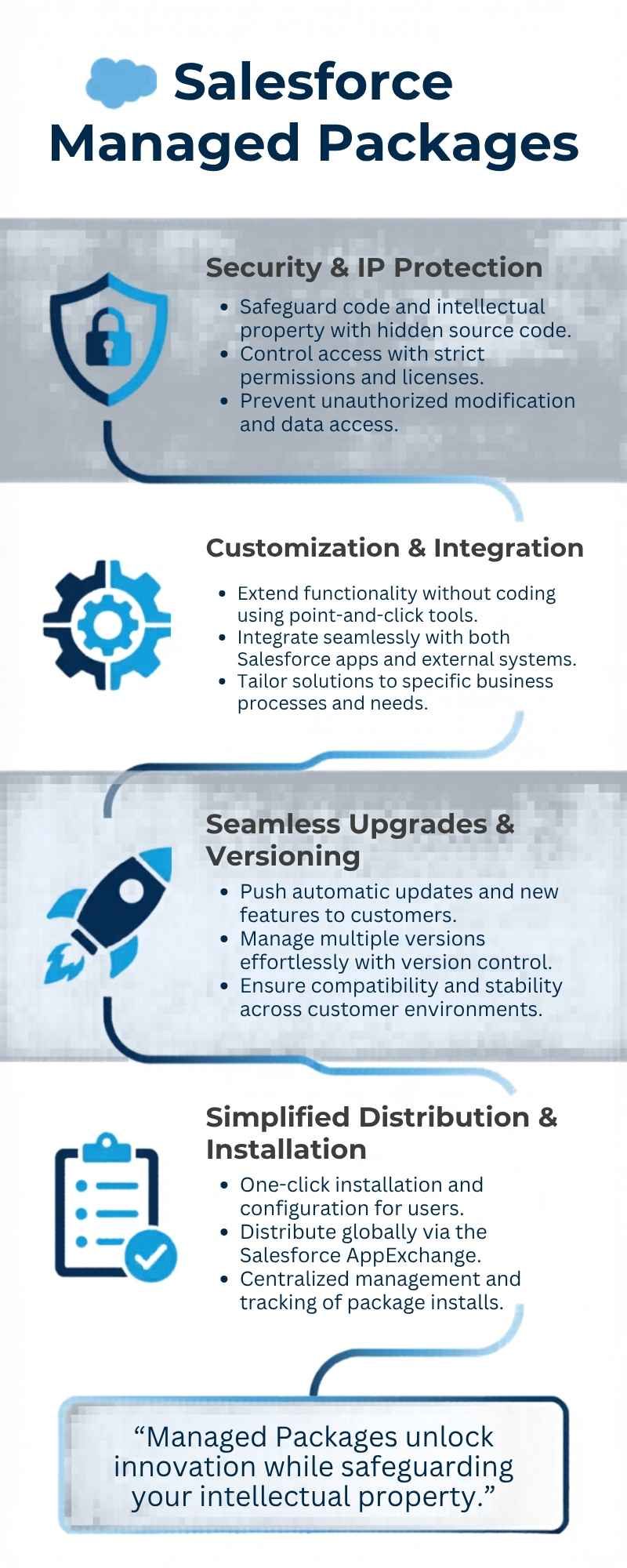
Salesforce managed package services provide you a scalable way to extend the platform functionality without developing solutions from scratch. It allows your business to deploy secure and upgraded applications. With its built-in version licensing, control and smooth updates, it simplifies customization and maintains performance, consistency and maintainability across the Salesforce environments. Here’s why you can use these packages
-
Fast Implementation
It gives you ready to use features, and allows you to implement software quickly. You don’t need to develop the complex software from scratch and configure systems within your organisation. In this way, it speeds up your project timelines and allows you to focus on strategic tasks rather than repetitive tasks.
-
Built-In Upgradeability
Another benefit of these packages is that it facilitates smooth upgrades. It provides you with new versions to launch apps with advancements and fix bugs. It keeps your cloud system up to date without redevelopment or system downtime.
-
Enhance compliance and security
It provides you with strong security through code encapsulation and a rigorous security review process. It protects your business and controls access with permissions. It makes it suitable for the enterprises that focus on compliance, security and safe third-party integrations.
-
Scalability for evolving business
These packages are fit to evolving business needs, and scale your operations. It handles large data, processes and users efficiently. This flexibility allows you to adapt to evolving needs without worry about performance bottlenecks or system limitations.
-
Consistency across Environments
It also maintains uniform functionality across Salesforce orgs. Whether you want to deploy it in production or sandbox, it allows you to maintain the same features and configurations. By maintaining consistency, it reduces errors, simplifies testing and ensures a standardized experience for users across different environments.
Key Features of Salesforce Managed Packages
The key characteristics and features of Salesforce Managed Packages that developers should know are given below
-
Namespace prefix
Salesforce Managed Packages include the namespace prefix and prevent conflicts with other customizations or packages in the org. It ensures the smooth integration with existing environments.
-
Version control
Another key feature is that it is able to support versioning. The experts can release updates and enhancements easily without disrupting the end-user operations.
-
License Management
These packages include the licensing features and allow the developers to control usage and access. It is useful for subscription-based models.
-
Protected component
By getting Salesforce managed service, you can easily secure the intellectual property that protects components in it. It also ensures that the users can’t view or modify the underlying code.
-
AppExchange Distribution
As these packages are designed for smooth distribution through AppExchange, it makes it easier for companies to discover and install them.
When to use Salesforce managed packages?
You can use these packages in the following scenarios
- If you want to develop commercial product
- If you want to publish on AppExchange
- If you want to protect Salesforce’s source code
- If you require licensing and customer tracking tools
- If you need support for versioning and upgrades
How to Easily Deploy Salesforce Managed Packages
For successful Salesforce managed package development and deployment, you should follow the given step-by-step guide.
-
Identify the right package
You must choose the right package for successful deployment. It is suggested to explore trusted packages on AppExchange and choose the right one that fits your business goals. To find the right package, here are the things you should consider
- Check reviews, ratings and industry use cases
- Compare features with CRM requirements
- Verify compatibility to salesforce edition
- Understand licensing and pricing
These considerations help you to find the right package that reduces future customization and troubleshooting efforts.
-
Review package requirements
Before installing the package, you must analyze all technical and functional requirements and avoid errors. Companies can also hire salesforce consultants to review package requirements. It is suggested to review the following requirements.
- Dependency on other apps
- Required Salesforce edition and API access
- Access controls and permission sets
- Setup and documentation guide
It ensures that you are fully prepared for a smooth installation.
-
Install in the Sandbox first
Next, for testing purposes, it is suggested to first install the salesforce package in a sand box environment, and ensure that it prevents disruptions in live systems. Here’s why the sandbox testing matters
- To avoid data loss or corruption
- Identify compatibility issues earlier
- Allow safe experimentation
It is suggested to use a partial or full sandbox for practical testing, replicate real business conditions and also involve staff during testing to test it well.
-
Configure Package settings
Next, you should configure package settings and ensure that it perfectly aligns with your business process. To configure, you must
- Setup workflows and automation rules
- Customize objects and fields
- Adjusts reports and dashboards
- Mapping data with existing CRM systems
Proper configuration ensures that the package will deliver you maximum usability and value.
-
Assign Roles and Permissions
User access play the crucial role in security and adoption. To assign roles and permissions, you must follow the given steps.
- Assign role access to users
- Restricts sensitive data access
- Use predefined permission sets
- Use different user profiles to test permissions
It ensures that the employees can access what they need and improve efficiency and security.
-
Perform Comprehensive Testing
Before moving to production, you must validate all workflows and features. It is suggested to follow the given checklist.
- Automate workflows and triggers
- Lead and data creation process
- Integration to third party tools
- Reports and dashboards accuracy
You must run multiple test cases to maintain stability under different scenarios.
-
Deploy to Production
Once you complete testing, you must proceed to deployments in the live environment. The deployment steps you should follow are
- Apply tested configurations
- Get managed services for Salesforce
- Follow the same installation process in the sandbox
- Cross-check the user permissions
- Notify teams before rollout
It ensures the successful deployment with a quick adoption rate and minimal disruption.
-
Monitor and Optimize Well
Deployment is not the final step; you must focus on ongoing monitoring for long-term success. For post-deployment success, you should follow the given steps.
- Gather user feedback
- Track system load times and performance
- Fix inefficiencies or bugs
- Optimize automation and workflows
Continuous improvement scales the CRM performance of your business efficiently.
Best Practices for Deploying Managed Packages
The developers must do the proper planning for successfully deploying Salesforce Managed Packages and ensure smooth integration and high performance. Here are the practices you should follow
-
Test in the sandbox always
You must install and test the package in a sandbox environment before deploying to production. It helps you to identify issues, test functionality and maintain compatibility without affecting your existing business operations. If you want an expert for testing, then you can hire salesforce developer.
-
Review documentation
You should go through the documentation carefully before installation. It gives you insight into features, configuration and dependencies, and avoids errors. It ensures proper implementation of managed packages.
-
Evaluates compatibility
Check whether the managed package is compatible with Salesforce edition, integrations and existing customizations. It reduces risks of conflicts, errors and performance issues after deployment.
-
Manage user permissions
You must assign the appropriate roles, profiles and permission sets after installing managed packages in Salesforce. It ensures security, avoids unauthorized usage and allows the users to use packages effectively on the basis of responsibilities.
-
Monitors the performance post-deployment
It is suggested to track system performance and user activity after installation. You should identify the slowdowns, bugs, or conflicts early, enable fixes in a timely manner and ensure smooth operations of your CRM environment.
-
Plan user training and adoption
You should ensure that your team learns how to use the new Salesforce managed packages. Give them training sessions, documentation and support to enhance adoption rates and increase the benefits of deployed solutions.
Conclusion
Understanding what salesforce managed packages and how they deploy it is important to enhance salesforce investments. It gives you a cost effective and scalable way to extend Salesforce capabilities, whether through custom solutions or off-the-shelf solutions.
The companies who want to elevate their project management capabilities can get the power of Salesforce managed packages. By choosing the in-built solutions on Salesforce, you can ensure smooth integration, ongoing innovation and better functionality. So if you are ready to take the CRM environment to the next level, then you can explore different types of Salesforce managed packages and choose the right one to get innovative opportunities.