Are you juggling with disconnected applications, data silos, and spending precious hours on manual data entry? You’re certainly not alone—businesses from every industry are experiencing the pain of disconnected systems that create barriers to productivity and customer interactions.
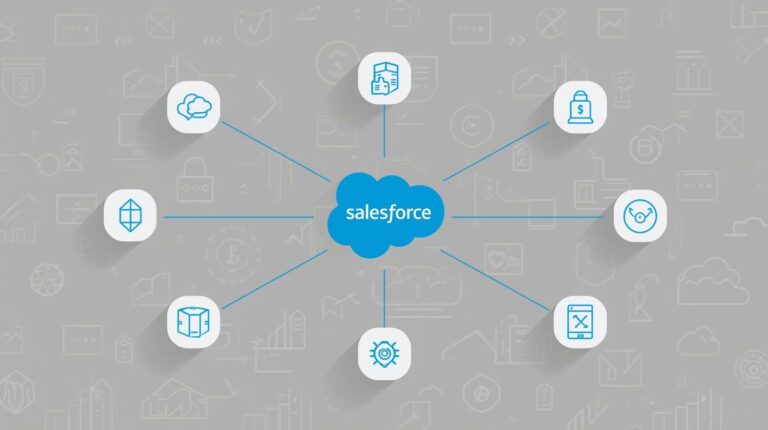
The answer to this dilemma is simple- apps integrated with Salesforce and utilize your CRM to create a single source of truth. As a result, it allows seamless workflows, increased visibility, and improved business decision-making processes.
With over 150,000 Salesforce customers worldwide, integration has gone from optional to a necessity to compete in today’s business environment. The Salesforce AppExchange offers thousands of different applications, providing analytics such as MuleSoft and Tableau, enabling businesses to realize over $4 billion in combined revenue by the end of 2025.
Salesforce accounts for a whopping 21.7% of the CRM marketplace; other competitors, such as Microsoft, Oracle, and SAP, significantly lag when comparing market share to Salesforce. The numbers illustrate that applications that are integrated with Salesforce are helping organizations grow and operate more efficiently.
In this article, we take a close look at “what apps can you connect with Salesforce” and the business benefits. Not only this, but we will also highlight some industry examples of how these applications help in improving the efficiency of companies’ operations.
Let’s dive in…
What are The Business Benefits of Apps Integrated with Salesforce
Through the apps integrated with Salesforce, companies have the opportunity to maximize their operational efficiency, improve the accuracy of their data, and enhance the way they engage with customers. In addition to that, businesses can also automate internal processes and provide a single view of their business operations’ data.
Increased Productivity with Automation
Connect apps to Salesforce automates the repetitive tasks of data entry, assigning leads, and running reports. These processes reduce errors that can occur from having someone enter incorrect data or from not completing a task correctly. Along with that, the automation feature also helps workflows to keep processes running smoothly, increasing team efficiency and enabling organizations to be more responsive.
Improved Data Accuracy
Salesforce integration apps allow for seamless integration of data into all connected applications, greatly reducing the chances of discrepancies and out-of-date information. As a result, teams gain access to the same set of accurate data in real time, enabling better decision-making across all departments within an organization. Access to reliable data also empowers organizations to deliver higher-quality reporting and analytics, helping them gain deeper insights into overall business performance. Our Salesforce Application Development Services further enhance these capabilities by delivering customized, scalable solutions tailored to specific business needs.
Faster Decision Making
By integrating applications with Salesforce, all information stored in one application comes together to allow a business leader access to this aggregated information through a single source. Having access to a single source of integrated data enables organizations to make quicker decisions faster than having to resort to sifting through the information from separate applications. Organizations that have quicker access to developed, comprehensive analytical insights will be less reactive as opposed to being proactive as a result.
Customer Satisfaction Increases
With Integrations, Businesses can provide consistently responsive, timely support and personalized interactions to their customers from all areas, including sales, service, and marketing. This consistency builds customer satisfaction and loyalty. Integration also allows businesses to quickly resolve customer issues and respond to customer inquiries.
Cost Savings from Improved Efficiency
By improving operational efficiency through the integration of apps, businesses can reduce the amount of time and labor that goes into producing paper copies of the manual. Processes. In addition, by automating many aspects of their operations, businesses will see a significant reduction in both hardware and software costs.
Flexibility to Support Business Growth
Apps associated with Salesforce are designed to support the growth of the business over time. An integration with an app enables a business to expand its offerings or products as it grows without breaking existing workflows within the organization. In addition, businesses gain the flexibility to adapt and innovate their product offerings as needs change, supported by reliable Salesforce support and maintenance services that ensure system stability, performance optimization, and ongoing enhancements.
Categories of Apps Integrated With Salesforce
The Salesforce app marketplace (AppExchange) is a platform that provides users with access to thousands of high-quality, third-party products, referred to as integration solutions, that enhance and expand the capabilities already available through Salesforce. It allows companies to improve business processes by eliminating data silos and creating seamless, automated workflows across functional areas and departments.
Integration apps for Salesforce range from those that support sales acceleration, marketing automation, and analytics to those that can be used for financial records and collaborations among employees (e.g., co-workers). Below are the key categories of applications that may be the answer to this blog, “What apps can you connect with Salesforce?” to increase the efficiency and scalability of a company’s operations.
Sales and CRM Productivity Apps
Sales and CRM productivity applications are two of the most common types of applications available for use in conjunction with Salesforce. These applications augment Salesforce’s main components of managing customer relationships by providing the capabilities to effectively track leads, manage opportunities, schedule and automate follow-up calls or emails, and ultimately close deals more quickly than they otherwise would. Salesforce CRM Services further enhance these capabilities by offering implementation, customization, integration, and ongoing support to help organizations maximize the value of their Salesforce investment.
By integrating these applications, sales representatives will be able to gain greater insight into their prospects. As well as reduce the amount of time they spend manually entering information into Salesforce.
Features:
- Lead Enrichment and Qualification
- Sales Pipeline Visibility
- Automated Follow-ups and Reminders
- Faster Approval of Contracts
Most Popular Salesforce Integration Applications:
- LinkedIn Sales Navigator
LinkedIn Sales Navigator enables sales professionals to enrich Salesforce records using real-time LinkedIn information. This provides sales teams with opportunities for social selling and more complete prospect research. In addition, sales representatives have the ability to identify decision-makers, stay updated with job changes, and build stronger relationships via Salesforce.
- DocuSign
DocuSign eliminates the need for printed copies of contracts and other legal transactions and provides the ability to send, sign, and save documents created through Salesforce electronically. As a result, DocuSign dramatically reduces the total transaction time needed to conduct business opportunities and increases the level of compliance.
- ZoomInfo
ZoomInfo is an online sales/contact database that specializes in providing updated, accurate B2B and firmographic contacts. ZoomInfo connected with Salesforce ensures that sales representatives are always working with the most up-to-date and reliable data available.
Example of a Business Use Case:
Sales teams using integrated Salesforce applications can track engagement from prospects in real-time, automate the documentation process, and close deals more efficiently. Salesforce applications must switch from one platform to another to keep track of their prospects and final contract-signing activity. This takes up time and may ultimately affect the amount of revenue the company generates.
Marketing Automation Apps
Marketing automation software (or Apps) connected through Salesforce are among the important tools for the management of Campaigns and Lead Nurturing as well as aligning marketing with sales objectives. The purpose of these apps is to create a seamless exchange of information between Marketing Platforms and Salesforce CRM.
When using Marketing Apps that connect with the Salesforce platform, businesses have an opportunity to create personalized marketing messages for their prospects/customers and provide accurate reporting on the success of their campaigns.
Main Features include:
- Lead Nurturing and Scoring
- Campaign and Email Automation
- Marketing Performance Tracking
- Sales and Marketing Alignment
Examples of Popular Marketing Automation Apps Integrated with Salesforce:
- HubSpot
HubSpot links marketing campaigns performed in HubSpot directly with Salesforce. This ensures all lead information (who to contact), campaign results, and customer interactions are aligned between all teams.
- Mailchimp
Mailchimp syncs email campaigns, audience information, and engagement statistics with Salesforce. Marketing teams use this integration to provide relevant and customized outreach to their audience while also tracking the return on investment (ROI) of their email and social media campaigns.
- Marketo
Marketo is a leading B2B Marketing Automation software provider. When integrated with Salesforce, Marketo provides tools for lead qualification, multi-channel (Email/SMS) Marketing Campaigns, and advanced reporting capabilities.
Advantages to Businesses:
- Streamlined customer journeys
- More effective lead qualification process and transition to the sales team
- Easier identification of marketing ROI
Customer Support and Service Apps
Another major area where apps built on Salesforce provide real value to the business is in their provision of Customer Support. A growing number of app developers are creating apps that work with Salesforce to manage and streamline all customer interactions and support ticketing processes; this allows support agents to resolve issues quickly and provides a better level of service to the customer. To build and scale such solutions effectively, businesses should hire Salesforce mobile app developers with proven expertise in customer support and service automation.
What These Applications Will Provide
- Case Management Automation
- Omnichannel Support for Customers
- Access to Up-To-Date Customer Data at Any Time
- Reports and Analytics On the Service Provided by the Support Teams
Top Integration Apps with Salesforce that Are Highly Used Are:
- Zendesk
Zendesk’s integration with Salesforce provides a single place to access Support Tickets, Customer Conversations, and Customer Case Histories. By using this integrated solution, Support Agents have access to their entire Customer Profiles in one view, without needing to leave Salesforce to do so.
- Freshdesk
Freshdesk provides Omnichannel Support to manage all Customer Interactions, whether they come through email, chat, phone, or Social Media. When integrated with Salesforce, Support Agents can provide their teams with all the background information they need on each Customer.
- ServiceNow
As one of the leading ITSM (IT Service Management) tools on the market today, ServiceNow’s integration with Salesforce allows large organizations to efficiently manage internal IT requests and external customer support requests, making it easier to hire Salesforce managed services for ongoing optimization and support.
Business Result
By utilizing these Customer Service Apps with Salesforce, Support Teams can gain a complete view of the Customer and respond faster with consistent experiences in the service that they provide.
Finance and Accounting Apps
Salesforce-integrated financial and accounting applications assist companies in managing their correct financial records, automating invoicing and billing, and increasing revenue visibility. Additionally, these Salesforce-integrated apps reduce the need for employees to do manual data entry between accounting and CRM (Customer Relationship Management) systems.
Key Capabilities of Salesforce Integrated Financial Applications:
- Automated Invoicing/Billing
- Payment Tracking and Reconciliation
- Revenue Forecasting
- Synchronize Financials
Popular Salesforce Integrated Financial Applications
- QuickBooks—This app enables users to sync invoices, payments, and customer information to/from Salesforce and provides an automated invoice creation system.
- Xero—This is an online accounting software program that allows users to view their current cash flow and prepare their financial statements. Using this app, users will be able to view up-to-date sales data, invoices, and accounts payable information.
- With Stripe-Through Stripe, users will be able to accept payments from customers directly through Salesforce while managing their subscription and one-off transactions.
Impact on Businesses
By integrating financial applications with Salesforce, organizations can eliminate siloed financial data and enhance their revenue reporting processes.
Analytics and Business Intelligence Apps
Tools that perform Analytics and Business Intelligence are some examples of applications that connect with Salesforce and provide the ability to make data-driven decisions. Analytics and Business Intelligence tools utilize the data within the Salesforce system, integrated with other third-party resources, to provide actionable intelligence to those making business decisions
Key Capabilities
- Reporting and Dashboarding
- Reporting Capabilities and Advanced Dashboarding
- Predictive Analytics
- Advanced Predictive Analytics
- Data Integration Across Multiple Platforms
- Integrate Data from Multiple Sources in Real-Time
- Performance Monitoring in Real-Time
- Monitor Performance Across All Business Units in Real-Time
Salesforce Integration Applications
- Tableau
Analytics and Business Intelligence Applications with data visualization/advanced analytics capability are provided by Tableau. Analytics and Business Intelligence applications are being used as a complement to Salesforce for the purpose of providing depth to the CRM data analyzed by the users of the application.
- Power BI
Power BI provides Dashboards, Reports, and Visualizations for Salesforce data to help the Leadership Teams monitor KPIs & Performance.
- MuleSoft
MuleSoft provides a Platform for connecting Salesforce data with third-party Systems/Databases/APIs to ensure that data flows seamlessly through the enterprise from an Integration perspective.
Enterprise Value of Analytics Applications for Salesforce
Using Analytics Applications in conjunction with Salesforce allows organizations to leverage Historical Trends for predictability and/or forecasting, and the use of Reliable Data will assist with improving Business Strategies.
Collaboration and Productivity Apps
Through the use of integrations with Salesforce, businesses can improve internal communication and team alignment by providing tools for collaboration among all employees. By decreasing the number of times people switch between contexts, these Salesforce-integrated applications also increase the amount of time that employees spend connected.
Core Functionalities
- Support for Real-Time Collaboration
- Collaboration and Document Synchronization
- Support for Multiple Channels for Communication
- Visibility of Task and Workflow
Popular Applications for Integrating with Salesforce
- Slack
The Slack integration with Salesforce enables your employees and teams to communicate and collaborate on Slack in real-time using data from Salesforce to drive their conversations and decision-making.
- Microsoft Teams
Microsoft Teams enables your employees and teams to collaborate, share files, and communicate in one space with data from Salesforce.
- Google Workspace
The Google Workspace integration with Salesforce enables your company to have all business communication in one place, with the ability to view all emails, calendars, and documents in Google Workspace and Salesforce.
Business Impact
When using applications for collaboration integrated with Salesforce, your employees and teams are better aligned, can respond quickly, and reduce their reliance on multiple separate solutions to communicate and collaborate.
Conclusion
In What Apps Can You Connect With Salesforce? Most organizations need an integrated Salesforce application to help streamline operations, improve data accuracy, and increase the quality of customer experiences. With many Salesforce integration applications available on the Salesforce marketplace, it’s easy for organizations to connect applications to Salesforce, such as in sales, marketing, finance, analytics, and customer support.
Integrations will eliminate siloed data across multiple systems, automate repetitive processes, and provide a single view of all business data. If properly chosen and implemented by businesses, these integrated Salesforce applications will enable businesses to scale quickly, make decisions more efficiently, and receive the total value from their Salesforce CRM investment.